



This iOS 26 toggle just fixed a problem that’s plagued my iPhone for years
Description
The updates since iOS 26 arrived have brought a lot of fresh tweaks and features to our iPhones, including the ability to tone down Liquid Glass, a new way to ensure you don’t accidentally switch off an alarm, better AirDrop security, and much more. But one of my favorite adjustments has nothing to do with any of that – instead, it’s all about the Lock Screen.
Originally released in iOS 26.1, you can now switch off the swipe gesture that opens the camera directly from your Lock Screen. You’re probably very familiar with this gesture – it’s a quick way to get the Camera app up and running without needing to unlock your phone and navigate to it the long way. When you need to move quickly and capture a fleeting moment, it’s a great option.
But the chances are you’ve also accidentally activated it more than once. And it’s exactly this issue that makes me so glad I can finally turn it off.
A persistent irritation
I’ve lost count of the number of times I’ve pulled my iPhone from my pocket, only to find the camera app is open without me realizing. It’s more than a nuisance—it’s entirely possible to inadvertently launch the camera and have it sitting like that in your pocket for a substantial amount of time, draining the battery without you ever knowing.
That turns this gesture from a mild inconvenience into a much larger problem, especially if my iPhone hasn’t got much juice left to begin with. I’ve never had my iPhone die on me because of an unintentional camera gesture, but I’m sure there are people who have.
Thanks to this new setting in iOS 26, though, I can forget about that ever happening. A quick foray into the Settings app and I can switch off the camera gesture for good, nipping this problem in the bud once and for all.
 <button class="lightbox-trigger" type="button">
<svg fill="none" height="12" viewBox="0 0 12 12" width="12" xmlns="http://www.w3.org/2000/svg">
<path d="M2 0a2 2 0 0 0-2 2v2h1.5V2a.5.5 0 0 1 .5-.5h2V0H2Zm2 10.5H2a.5.5 0 0 1-.5-.5V8H0v2a2 2 0 0 0 2 2h2v-1.5ZM8 12v-1.5h2a.5.5 0 0 0 .5-.5V8H12v2a2 2 0 0 1-2 2H8Zm2-12a2 2 0 0 1 2 2v2h-1.5V2a.5.5 0 0 0-.5-.5H8V0h2Z" fill="#fff"></path>
</svg>
</button><figcaption class="wp-element-caption">
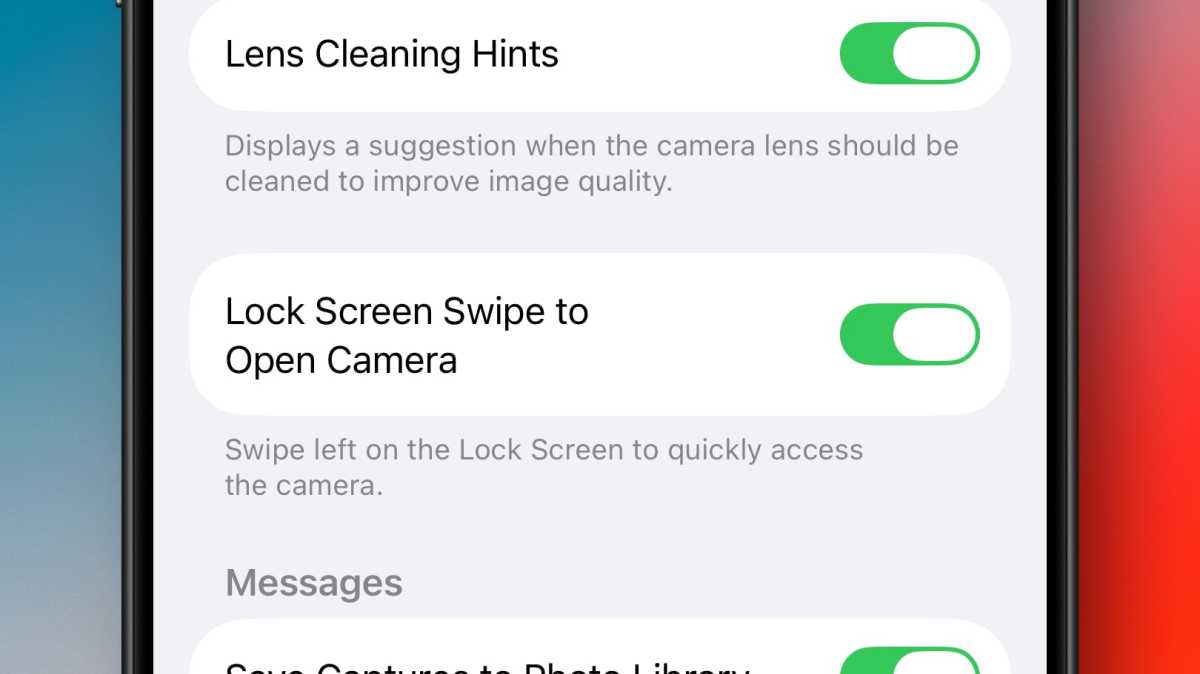
iOS 26 now lets you turn off the Lock Screen swipe gesture that launches the Camera app.
</figcaption></figure>Foundry
How to turn off the Lock Screen camera gesture
Disabling the gesture that launches the camera from your Lock Screen is quick and simple. Follow the steps below and you’ll never have to put up with accidental camera-induced battery drain again.
- 1. Open the Settings app on your iPhone
- 2. Navigate to the Camera section and tap it
- 3. Scroll to the bottom of the list until you see Lock Screen Swipe to Open Camera
- 4. Tap the toggle next to this text to disable the feature
Now, swiping from right to left across your Lock Screen will do nothing – no more camera and no more unknowing battery drain while your phone sits idly in your pocket.
Of course, you might change your mind down the line and decide you actually want this gesture back. In which case, just return to the Settings app and re-enable the toggle, undoing the change. Apple hasn’t removed the offending gesture entirely and has merely made it an optional feature that can be enabled and disabled as you like.
That said, I can’t remember the last time I needed to use this gesture to open the Camera—especially now that the Camera Control is a far quicker and more reliable method. Failing that, I’ve got the Camera app icon on my Lock Screen, which is harder to accidentally activate due to it requiring a long press rather than a swipe.
So I’m going to miss the gesture that has plagued my iPhone for so long. Instead, I now know that every time I pull my phone from my pocket, I’ll be greeted by a blank Lock Screen instead of a drained battery. And that’s the kind of small tweak that can make a big difference.


 United States
