



AI Video Enhancer for Mac: Restore, Enhance & Achieve Natural 4K
Description
<html><body>
Watching old home movies or smartphone clips on a Retina or 4K Mac screen often reveals flaws you didn’t notice before: pixelation, digital noise, motion blur. These imperfections stand out more on modern high-resolution displays, calling for smarter video enhancement tools
That’s where Aiarty Video Enhancer comes in. This brand-new AI-powered tool for macOS (and Windows) turns low-quality videos into crisp, vibrant 4K footage — all with just a few clicks. Whether you’re a beginner or just need a fast fix, Aiarty makes professional-grade video enhancement simple and accessible. It uses cutting-edge AI to sharpen details, reduce noise, and smooth out blur quickly and effortlessly.
Limited-Time Offer: Try Aiarty Video Enhancer with a free license—no watermarks, full features included. Plus, save 30% on a Lifetime License with one payment and lifetime updates.
<figure class="wp-block-embed is-type-video is-provider-youtube wp-block-embed-youtube wp-embed-aspect-16-9 wp-has-aspect-ratio">
<iframe loading="lazy" title="Aiarty Video Enhancer Showcase Video 2" width="500" height="281" src="" frameborder="0" allow="accelerometer; autoplay; clipboard-write; encrypted-media; gyroscope; picture-in-picture; web-share" referrerpolicy="strict-origin-when-cross-origin" allowfullscreen data-src="https://www.youtube.com/embed/XTNeShvKwYo?feature=oembed"></iframe>
Common Video Quality Issues
Before improving your footage, it’s helpful to understand why videos sometimes look worse on high-res screens:
- Low resolution: Many older clips max out at 480p or 720p, which shows pixelation when enlarged.
- Compression artifacts: Over-compression leads to blocky edges and color banding.
- Noise and grain: Especially visible in low-light shots from smartphones and webcams.
- Motion blur: Shaky hands or fast movement can blur details.
- Low frame rates: Videos shot at 15fps or 24fps may appear choppy or stutter.
Effortless Video Enhancement with Aiarty Video Enhancer
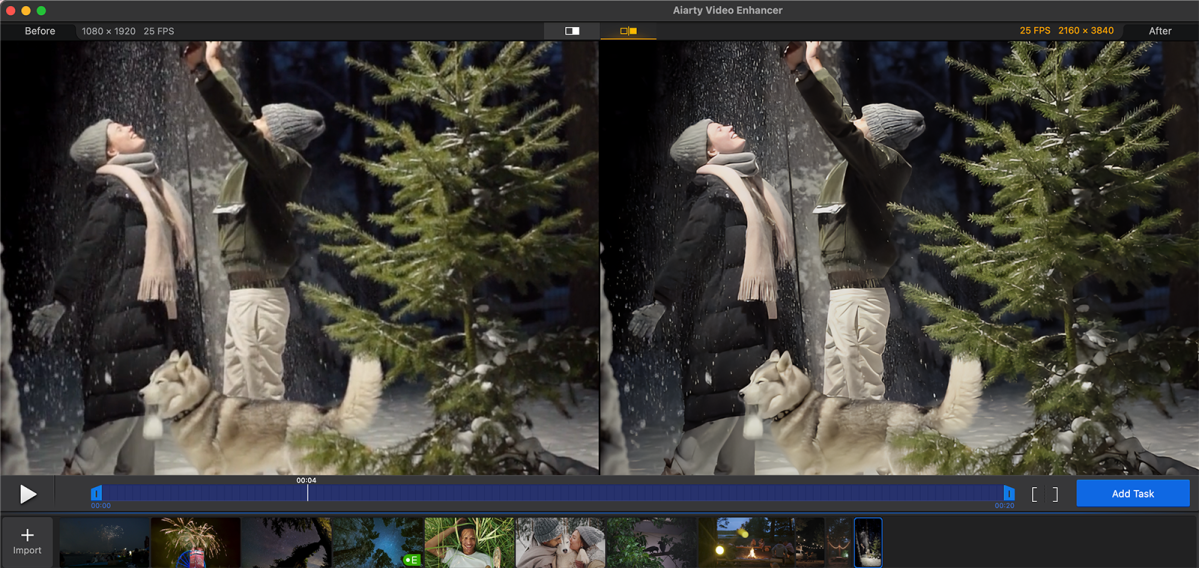
Aiarty Video Enhancer leverages state-of-the-art AI technology to tackle these common issues intelligently — upscaling, denoising, deblurring, and smoothing your footage with minimal effort. Built exclusively for Mac, it delivers fast, professional-quality results on both Intel and Apple Silicon (M1, M2, M3) machines. With full GPU acceleration and a sleek, intuitive interface, Aiarty makes high-end video enhancement easy—even for users with no editing experience.
Specialized AI Models Tailored to Your Content
At the heart of Aiarty’s capabilities are three optimized AI models, each designed to tackle specific video challenges and content types.
- moDetail-HQ v2 combines diffusion and GAN techniques to enhance sharpness and eliminate artifacts. It’s ideal for refining hair, skin, outdoor scenery, and textured surfaces.
- Smooth-HQ v2 delivers a softer, more natural look by removing blur and noise while preserving color accuracy and fine details—perfect for family events, vlogs, Zoom calls, tutorials, and product demos.
- superVideo vHQ is built for difficult low-light footage, dramatically reducing noise and artifacts in night scenes, concerts, surveillance videos, and dim environments.
 <button class="lightbox-trigger" type="button" aria-haspopup="dialog" aria-label="Enlarge image: improve video quality on mac" data-wp-init="callbacks.initTriggerButton" data-wp-on-async--click="actions.showLightbox" data-wp-style--right="context.imageButtonRight" data-wp-style--top="context.imageButtonTop">
<svg xmlns="http://www.w3.org/2000/svg" width="12" height="12" fill="none" viewbox="0 0 12 12">
<path fill="#fff" d="M2 0a2 2 0 0 0-2 2v2h1.5V2a.5.5 0 0 1 .5-.5h2V0H2Zm2 10.5H2a.5.5 0 0 1-.5-.5V8H0v2a2 2 0 0 0 2 2h2v-1.5ZM8 12v-1.5h2a.5.5 0 0 0 .5-.5V8H12v2a2 2 0 0 1-2 2H8Zm2-12a2 2 0 0 1 2 2v2h-1.5V2a.5.5 0 0 0-.5-.5H8V0h2Z"></path>
</svg>
</button></figure>
Digiarty
Reduce Video Noise Without Losing Detail
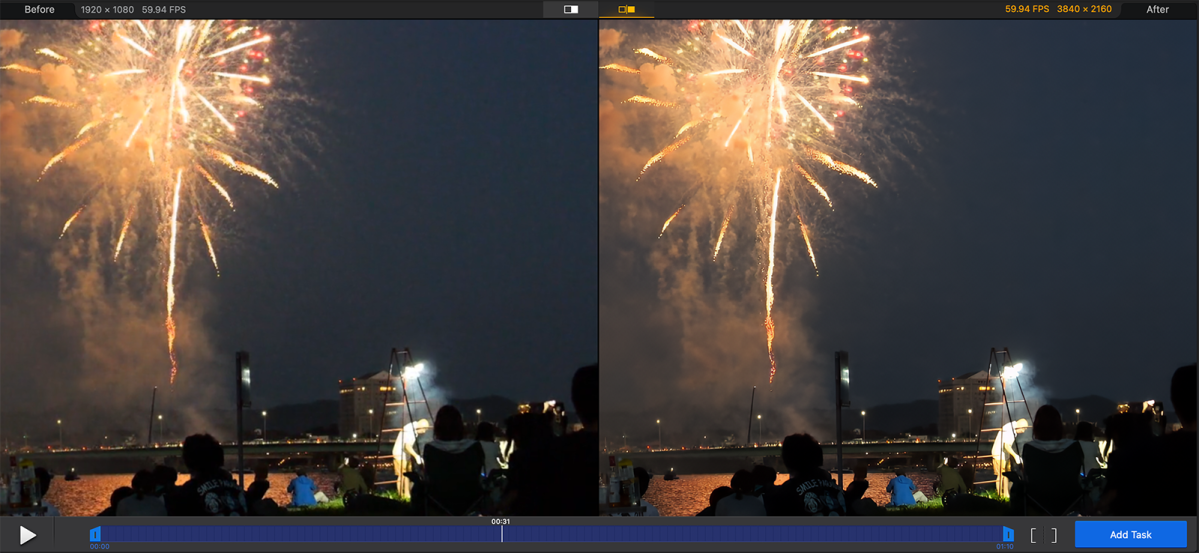
Grain, compression blocks, and noise are common problems, especially in smartphone or webcam footage shot in low light. Aiarty’s advanced denoise filters, especially the superVideo vHQ model, effectively reduce noise while keeping important details intact, resulting in smoother, clearer visuals even in challenging lighting.
Real-word Test: Denoise a low-light video for noticeably cleaner results
 <button class="lightbox-trigger" type="button" aria-haspopup="dialog" aria-label="Enlarge image: enhance video on mac" data-wp-init="callbacks.initTriggerButton" data-wp-on-async--click="actions.showLightbox" data-wp-style--right="context.imageButtonRight" data-wp-style--top="context.imageButtonTop">
<svg xmlns="http://www.w3.org/2000/svg" width="12" height="12" fill="none" viewbox="0 0 12 12">
<path fill="#fff" d="M2 0a2 2 0 0 0-2 2v2h1.5V2a.5.5 0 0 1 .5-.5h2V0H2Zm2 10.5H2a.5.5 0 0 1-.5-.5V8H0v2a2 2 0 0 0 2 2h2v-1.5ZM8 12v-1.5h2a.5.5 0 0 0 .5-.5V8H12v2a2 2 0 0 1-2 2H8Zm2-12a2 2 0 0 1 2 2v2h-1.5V2a.5.5 0 0 0-.5-.5H8V0h2Z"></path>
</svg>
</button></figure>
Digiarty
Deblur — Sharpen Motion and Restore Detail
Videos with shaky hands or fast motion can look soft or blurry. Aiarty’s deblurring technology sharpens edges and textures precisely—without adding unwanted artifacts—making your footage look crisp and professional. The moDetail-HQ model restores crisp details like hair and foliage, while the Smooth-HQ model offers a more subtle, natural correction.


 United States
