



QNAP TBS-h574TX NASbook review: Fast workgroup storage
Description
At a glance
Expert's Rating
Pros
- Supports both M.2 and E.1S NVMe SSDs
- Excellent throughput via Ethernet (10Gbps) and Thunderbolt (20Gbps)
- Unique semi-retro look
- Myriad NAS/server software features
Cons
- Not cheap.
Our Verdict
If you’re looking for fast, versatile workgroup storage, the highly capable TBS-h574TX deserves close scrutiny. It can be accessed directly via Thunderbolt or remotely via the network and offers all the software capabilities NAS/server boxes bring to the table.
Price When Reviewed
This value will show the geolocated pricing text for product undefined
Best Pricing Today
Best Prices Today: QNAP TBS-h574TX Thunderbolt SSD NAS

Product
Price
Price comparison from Backmarket
QNAP’s combo NAS/DAS (Network/Direct) attached TBS-h574TX storage box gives you the best of both worlds. It allows any number of users to connect to it over the local network at 10Gbps (or 2.5Gbps) and leverage it as shared storage or employ the myriad NAS/server apps and capabilities. But you can also attach it to your Mac’s Thunderbolt port for twice-as-fast 20Gbps (network bridge) local access to the data on board. Sweet.
The TBS-h574TX is a somewhat retro-looking, squat rectangle of a NAS (network-attached storage)/direct-attached box measuring 2.36 inches thick, 8.46 inches wide, by 7.83 inches deep. It’s a most substantial piece of metal-based kit, weighing in at just a hair under 5 pounds. With the no-slip feet, there’s little chance of knocking this puppy off the desk. Just the same, make sure all cables are secured at some point before they reach the box. I’ve seen more instances of tripping on wires, pulling hardware off its perch, than actual displacement of the equipment itself.
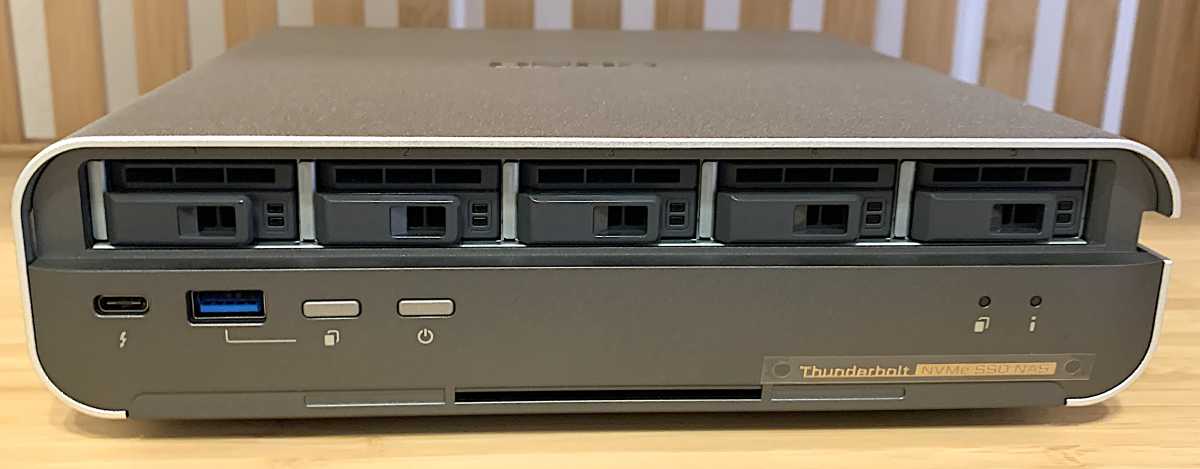
There are five bays with easy-access drive trays on board that accept state-of-the-art E.1S (see the explanation below) or M.2 (4.5mm heatsinks or thinner) NVMe SSDs. You can access the bays/tray from the front of the TBS-h574TX after removing the locking, pop-off, top half of the front cover.
The SSD slots are PCIe 3.0, though you may use PCIe 4.0 or 5.0 SSDs, which are, of course, backwards compatible. I recommend PCIe 4.0 as PCIe 3.0 SSDs are becoming pricey and hard to come by, and PCIe 5.0 is expensive overkill.
 <button class="lightbox-trigger" type="button">
<svg fill="none" height="12" viewBox="0 0 12 12" width="12" xmlns="http://www.w3.org/2000/svg">
<path d="M2 0a2 2 0 0 0-2 2v2h1.5V2a.5.5 0 0 1 .5-.5h2V0H2Zm2 10.5H2a.5.5 0 0 1-.5-.5V8H0v2a2 2 0 0 0 2 2h2v-1.5ZM8 12v-1.5h2a.5.5 0 0 0 .5-.5V8H12v2a2 2 0 0 1-2 2H8Zm2-12a2 2 0 0 1 2 2v2h-1.5V2a.5.5 0 0 0-.5-.5H8V0h2Z" fill="#fff"></path>
</svg>
</button><figcaption class="wp-element-caption">The front of the QNAP TBS-h574TX with its cover off to expose the hot-swappable SSD bays.</figcaption></figure>
Along with the convenient Type-C Thunderbolt port on the face are another 10Gbps Type-A port, quick copy and power buttons, as well as power and activity indicator lamps.
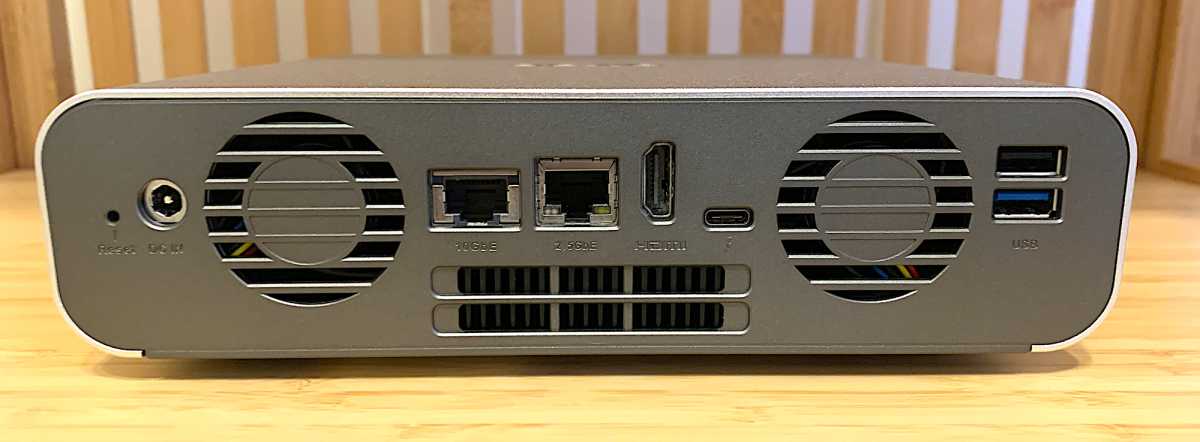
The Thunderbolt port on the back is PC/Mac connect-only, so you can’t use external devices or peripherals with it. Also on the back are 2.5Gbe and 10Gbe ports, a 10Gbps Type-A USB and 5Gbps Type-A port, as well as HDMI output. Then of course, there’s the coax power port.
 <button class="lightbox-trigger" type="button">
<svg fill="none" height="12" viewBox="0 0 12 12" width="12" xmlns="http://www.w3.org/2000/svg">
<path d="M2 0a2 2 0 0 0-2 2v2h1.5V2a.5.5 0 0 1 .5-.5h2V0H2Zm2 10.5H2a.5.5 0 0 1-.5-.5V8H0v2a2 2 0 0 0 2 2h2v-1.5ZM8 12v-1.5h2a.5.5 0 0 0 .5-.5V8H12v2a2 2 0 0 1-2 2H8Zm2-12a2 2 0 0 1 2 2v2h-1.5V2a.5.5 0 0 0-.5-.5H8V0h2Z" fill="#fff"></path>
</svg>
</button><figcaption class="wp-element-caption">The back of the TBS-h574TX with its Ethernet ports, USB ports and dual exhaust fans.</figcaption></figure>
Note that you do not need to shut down the TBS-h574TX just to swap out a bad drive. If you use a suitable RAID mode (1, 1+0, 5, etc.) the array will remain available and rebuild in the background. Remember that when you configure the storage in any RAID-capable device.
As a fully functional NAS box/server, the TBS-h574TX we tested sported a 4.5Ghz, Core i5-1340PE (12 cores, 16 threads) and 16GB of DRAM, plus 5GB of NAND for basic functionality before you install the full operating system. Note that this differed from the a 4.4GHz Core i5-1235U CPU listed on the product page.
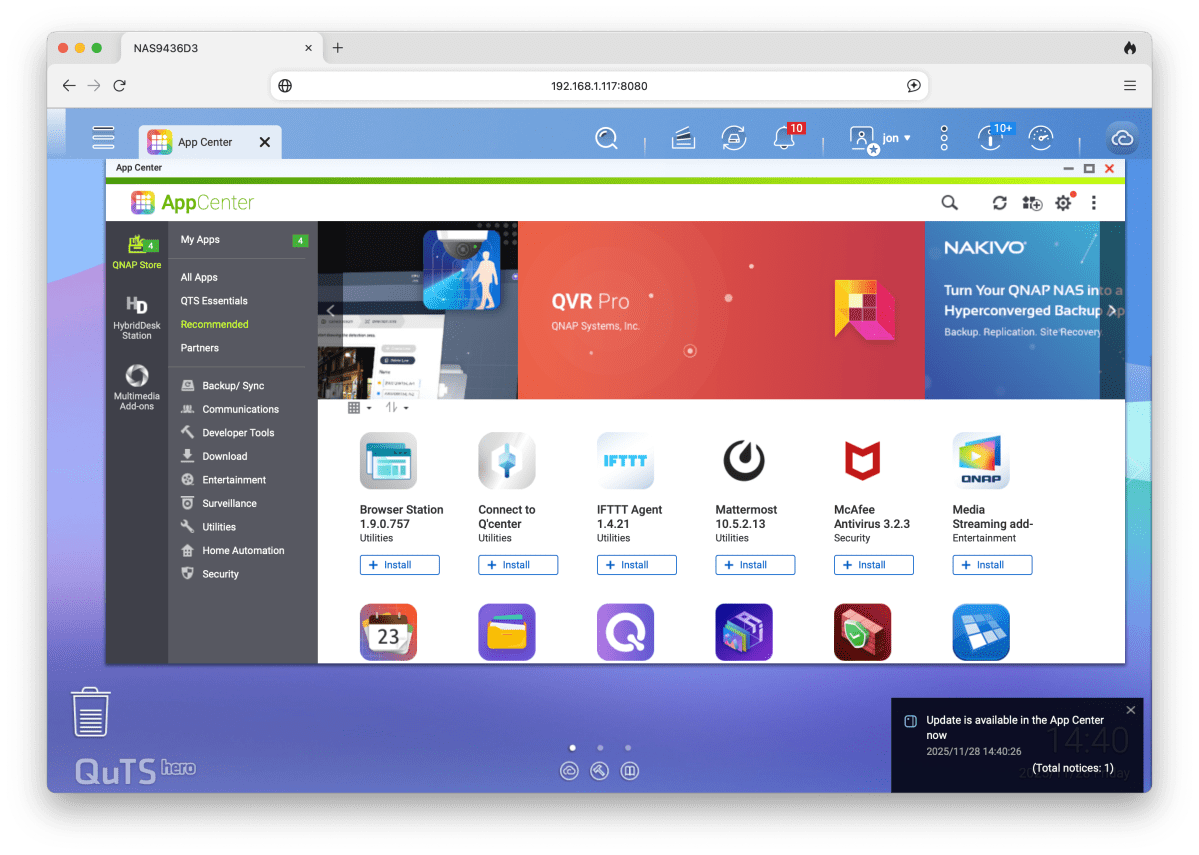
If you’re not familiar with NAS and wonder “Why a CPU?”… The TBS-h574TX’s capabilities go far beyond simple storage. QNAP’s full-on QuTS hero OS, née (QTS NAS OS) and apps let it serve as a multimedia server, multimedia playback unit (via HDMI), a backup engine, virtual machine and docker host, surveillance station, and a lot more.
I’ve used QNAP NAS boxes for years, and the backup capabilities (both local and cloud) are outstanding. Note that surveillance requires purchasing more licenses if you have more than one IP cam.
 <button class="lightbox-trigger" type="button">
<svg fill="none" height="12" viewBox="0 0 12 12" width="12" xmlns="http://www.w3.org/2000/svg">
<path d="M2 0a2 2 0 0 0-2 2v2h1.5V2a.5.5 0 0 1 .5-.5h2V0H2Zm2 10.5H2a.5.5 0 0 1-.5-.5V8H0v2a2 2 0 0 0 2 2h2v-1.5ZM8 12v-1.5h2a.5.5 0 0 0 .5-.5V8H12v2a2 2 0 0 1-2 2H8Zm2-12a2 2 0 0 1 2 2v2h-1.5V2a.5.5 0 0 0-.5-.5H8V0h2Z" fill="#fff"></path>
</svg>
</button><figcaption class="wp-element-caption">Just some of the apps available for the QuTS hero OS that runs the TBS-h574TX.</figcaption></figure>
What are EDSFF and E.1S?
EDSFF stands for Enterprise and Data center SSD


 United States
