


Every Pixel a Color
Description
Every Pixel a Color. Dan’s MEGA65 Digest for November 2025.
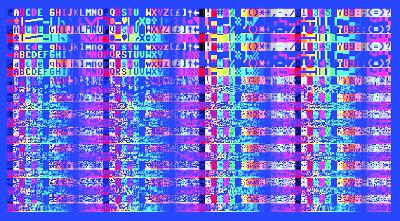
<figure>
<figcaption>
Every Pixel a Color.
</figcaption>
</figure>
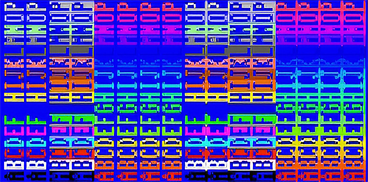
<figure>

<figcaption>
A colorful @.
</figcaption>
</figure>
It’s November, and you know what that means: it’s time to level up our MEGA65 graphics knowledge! In this Digest, we reach another major milestone in our VIC-IV journey: full color character graphics. Type-ins galore, so warm up those coding fingers.
Let’s start with the news, then get right at it.
Dan’s MEGA65 Digest 2025
<figure class="youtube-player">
<figcaption>
Dan’s MEGA65 Digest 2025
</figcaption>
</figure>
My talk from Vintage Computer Festival Midwest 2025, Dan’s MEGA65 Digest 2025, is now online. This one looks at the MEGA65 through the lens of this very newsletter over the last few years. It’s a haphazard introduction to the platform, its capabilities, and its community (that’s you!).
I tend to give these talks to audiences that still haven’t heard about us, so there’s always quite a bit of introductory overlap. Hopefully there’s enough new stuff, or at least enthusiastic review, for you to enjoy.
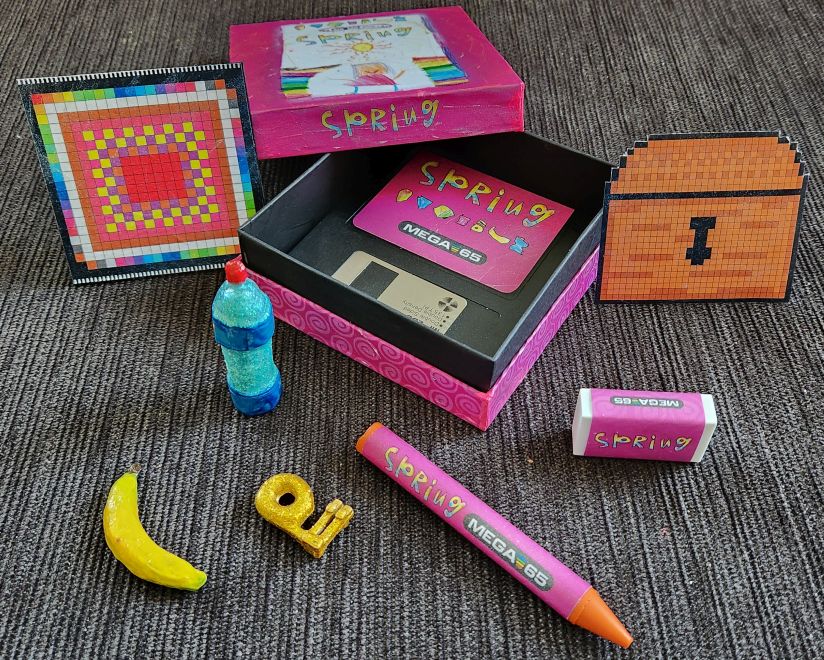
Spring, a limited edition boxed release
<figure>
<figcaption>
Spring, a limited edition boxed release by Gurce’s family.
</figcaption>
</figure>
Gurce’s artistic family is producing a limited edition boxed title for the MEGA65. Entitled Spring, the game is designed by Gurce’s daughter, and will be distributed on floppy disk, with boxes and add-ons by Gurce’s sister.
Spring will be available to the MEGA65 community in strictly limited quantities. If you’d like one, contact Gurce on the Discord. Check out the game’s website for more information, poster art, and a guide to the game.
Featured Files
<figure>
<figcaption>
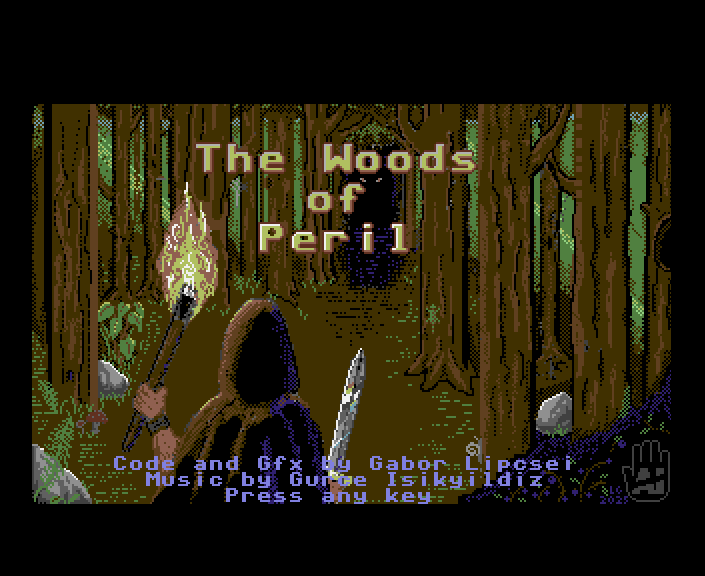
The Woods of Peril, by Lipi.
</figcaption>
</figure>
The Woods of Peril by Lipi, an original text and graphics adventure game. Music by Gurce. Navigate the forest with cursor keys: rotate left and right, move forward or backward. Follow on-screen prompts in villages and during battle.
Overlord by Drex. Navigate the maze and avoid the Overlord. Listen for his footsteps, avoid his line of sight, and try to make it to the end. Based on Drex’s own Alpha Maze. Use keyboard controls to move: W, A, S, D, and Q and E to rotate.
Yet another core for your home arcade from muse, Mr. Do! is now available. Collect cherries, avoid monsters, and defend yourself by pushing giant apples and throwing your ball.
Recap: Two and four colors per character
In the September Digest, we introduced Super-Extended Attribute Mode (SEAM) and the CHR16 register, a feature that allowed us to commit more memory to graphics to access more features. So far, we only got more screen codes out of the deal, but that’s a pretty big step up! We were able to fill screen memory with ascending screen codes to make a screen-wide bitmap quilt of monochromatic tiles.
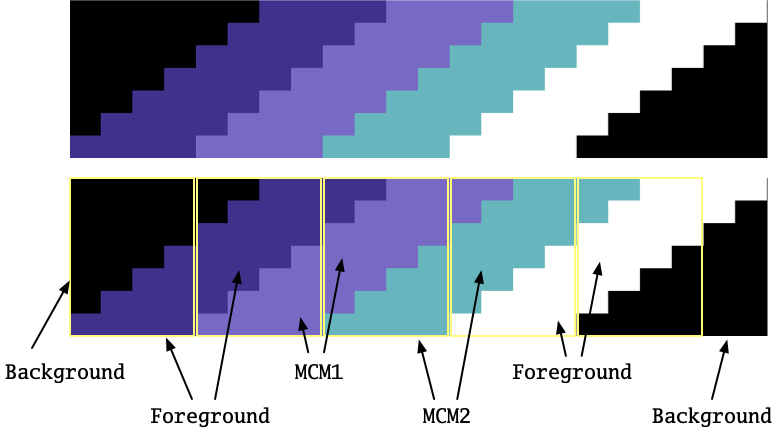
I left all of the foreground colors white in that example, but we could have proceeded to assign different foreground colors to each 8x8 patch, within the first 32 palette entries. Clever pixel artists know how to hide the color transitions between character boundaries. This gets especially interesting in combination with Low-res Multicolor Mode, like so:
<figure>
<figcaption>
Hiding character boundaries in MCM mode.
</figcaption>
</figure>
In this example, the background color and two MCM colors are the same for every character on the screen, requiring careful planning to blend them with individual character foreground colors. And MCM doubles the visible width of the character pixels, potentially giving those characters a chunky look. Four possible colors per character provides more options, within these limitations.
Introducing Full Color Mode
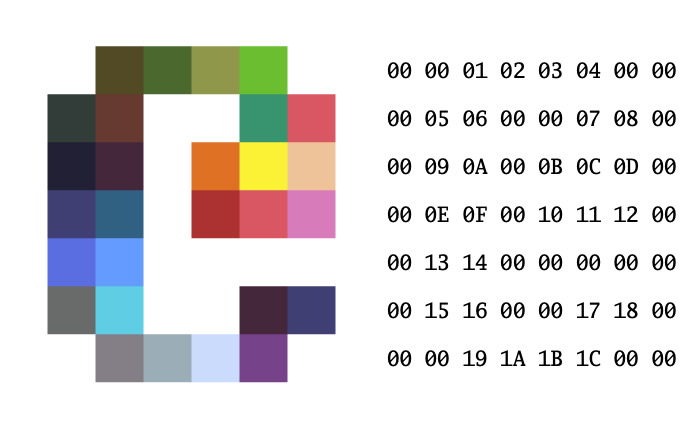
The MEGA65 can take this to the next level. In Full Color Mode (FCM), the VIC-IV can assign a different palette entry to each high resolution pixel of a character in a character set. Instead of one bit per pixel selecting between the character’s foreground color or the screen’s background color, FCM uses one byte per pixel. Value $00 is still the background color, and $FF is the character foreground color. Values $01 to $FE select the corresponding colors directly off the palette.
<figure>
<figcaption>
An FCM character, in 64 bytes, with a custom palette
</figcaption>
</figure>
We started this series on character graphics with the observation that assigning a 23-bit color value to every pixel would be impractical. It uses too much memory, and by extension is too slow to update. A 640 x 200 screen with 23 bits for every pixel would require 359.375 kilobytes—nearly all of the MEGA65’s chip RAM for a single screen.
Full Color Mode strikes a balance: it’s still character graphics, and it’s still indirectly specifying the 23-bit color with an 8-bit palette. A program like a game looking to update the display quickly can still do so with minimal memory changes, using references to character tiles. To perform our full-screen bitmap trick with 80 x 25 = 2,000 character codes, FCM would demand 64 bytes per character, or 128,000 bytes (125 kilobytes) of character set graphics data. That’s still a lot of memory, but it’s doable.
Important facts about Full Color Mode
There are two important things to know about Full Color Mode. The first is that FCM is a feature of Super-Extended Attribute Mode, and requires that CHR16 be enabled.
The second important thing to know is that in Full Color Mode, screen memory does not store screen codes. Instead, it stores the absolute address of the 64 bytes of character data. CHARPTR is ignored for characters referenced in this way. For example, a screen code of $1000 (4096 decimal) refers to 64 bytes at address $1000 x $40 = $4.0000.
A character address must be aligned to a 64-byte boundary: screen memory stores the address divided by 64. With CHR16 enabled, there are 13 bits of screen memory per character, with a maximum character address of $1FFF x 64 = $7FFC0 – $7FFFF. MEGA65 chip RAM only goes up to $5FFFF, so you effectively have all of chip RAM to store full-color graphics character tiles.
<figure>

<figcaption>
With FCM enabled, the 13 bits of screen memory store an absolute address divided by 64.
</figcaption>
</figure>
I’m calling this out as important because it’s a common tripping point for developers learning FCM for the first time. This absolute address behavior is described in the manual, but the current state of this information is a series of brief paragraphs, so it’s easy to miss.
FCLRHI and FCLRLO
To enable FCM for screen codes 0 to 255, set register FCLRLO bit 1 of address $D054. To enable it for screen code 256 and higher, set register FCLRHI $D054 bit 2. Enabling FCM changes the interpretation of the affected screen codes to absolute 64-byte-aligned addresses.
Having separate FCM switches for lower and upper screen codes makes it easy to support both traditional cha







 United States
